POS Awesome POSAW • EPSON ESC/POS
Launch POSAW →
⚡ HARDWARE-NATIVE ESC/POS • SUB-100MS LATENCY • DUAL-SCREEN BROADCAST

Hardware-Native POS Awesome
with Epson Middleware Integration

Zero-delay frontline counter operations powered by POS Awesome (POSAW) and Epson Middleware. Direct raw TCP thermal receipt dispatch, electronic cash drawer pulse kick, smart dish modifiers, pre-payment guest checks, and dynamic dual-screen customer menu displays.

< 100ms
Hardware Dispatch
24V DK
Dual-Pin Drawer Kick
100%
Cart Preservation on Bill Print
ESC/POS
Direct IP Print Routing
Frontline Seating & Hospitality

Visual Floor Plan & Dining Room Management

Fast, touch-first table layout navigation. Cashiers and servers toggle between dining zones, select available tables, monitor live occupied checks, and transfer orders across stations seamlessly.

Floor Plan Control

Dynamic Seating Zones & Open Table State

High-velocity floor navigation designed for bustling dining rooms. Color-coded table indicators reveal occupied, available, and reserved statuses with immediate visual feedback.
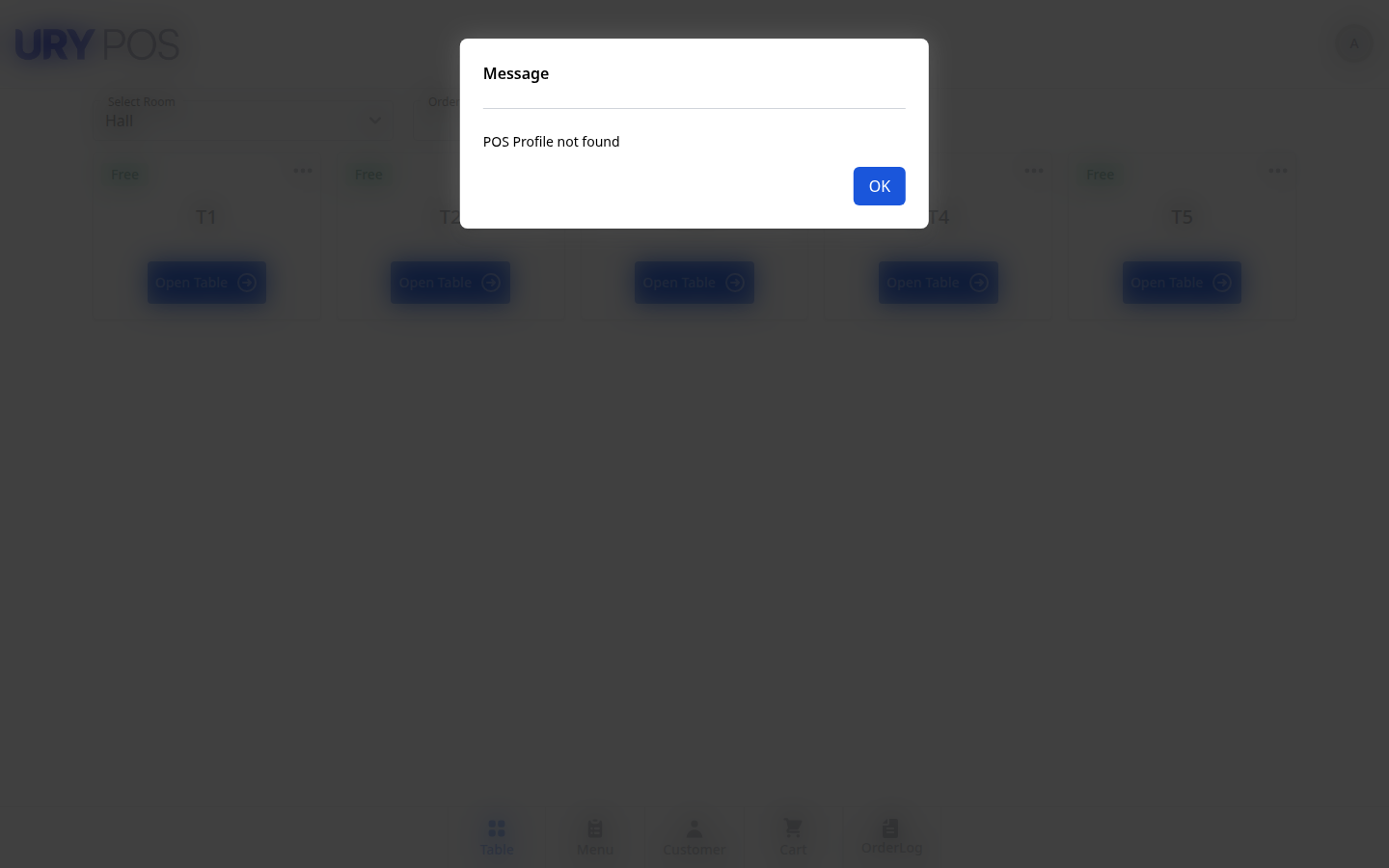
  • ✓ Zone Tabs: Instant switching between Main Hall, Terrace, VIP Rooms, and Outdoor dining sections.
  • ✓ Table Capacity Indicators: View table guest limits, assigned server tags, and open ticket durations at a glance.
  • ✓ Order Split & Transfer: Reassign active tables or split checks directly from the visual floor map without cancelling cart items.
  • ✓ Direct POS Link: Selecting a table instantly opens its active ticket or spins up a fresh cart in under 50ms.
GET /app/posawesome#table-selection
pos.local/app/posawesome#floor-plan
POS Floor Plan Table Selection
📷 Live POSAW Screen • Floor Plan & Table Selection Inspect Floor Plan ↗
Smart Customization

Item Modifiers, Cooking Options & Add-on Selector

Never miss an order detail. When cashiers click on customizable menu items, POS Awesome launches an intuitive modifier dialog handling temperature, preparation notes, sauces, and paid extras.

Modifier Engine

Enforced Modifier Rules & Dynamic Pricing

Configure single-choice required modifiers (e.g., Doneness: Rare, Medium, Well Done) alongside multi-select optional add-ons (Extra Cheese, Jalapeños, Truffle Sauce).
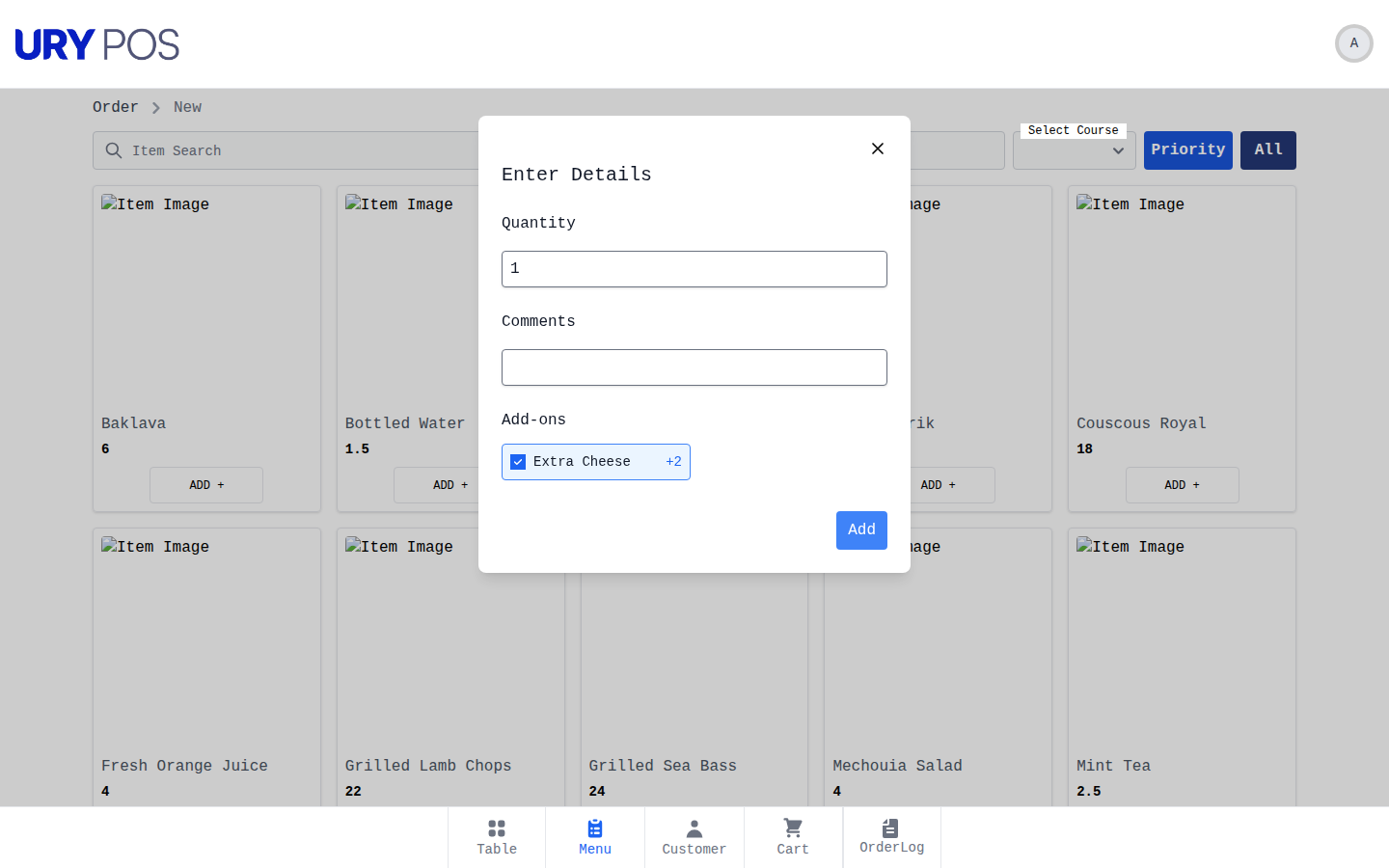
  • ✓ Mandatory vs. Optional: Cashier cannot add item until mandatory kitchen choices are satisfied, preventing chef re-queries.
  • ✓ Incremental Pricing: Add-ons automatically recalculate line item totals and apply tax rules transparently.
  • ✓ Kitchen Routing Tags: Modifiers print prominently in bold/red under the item name on Epson kitchen order tickets (KOT).
  • ✓ Freeform Notes: Support for special allergy or guest preference instructions passed directly to station chits.
POST /api/method/pos_bridge.api.get_item_addon_groups
pos.local/app/posawesome#addon-modal
POS Item Modifier Addon Modal
📷 Live POSAW Screen • Item Modifier & Addon Selector Test Addon Picker ↗
Financial Audit & Settlement

POS Invoices & Shift Register Reconciliation

High-volume retail requires uncompromising financial reconciliation. Every transaction processed across touch terminals syncs directly into native POS Invoice ledgers, maintaining real-time auditability across payment modes, draft queues, and closing balances.

Register Stream

Real-Time Shift Closing & Multi-Tender Audit

Automated tallying of cash, card, and digital payment tenders preventing register discrepancies. Full visibility into customer identifiers, invoice lifecycle status, and grand totals.
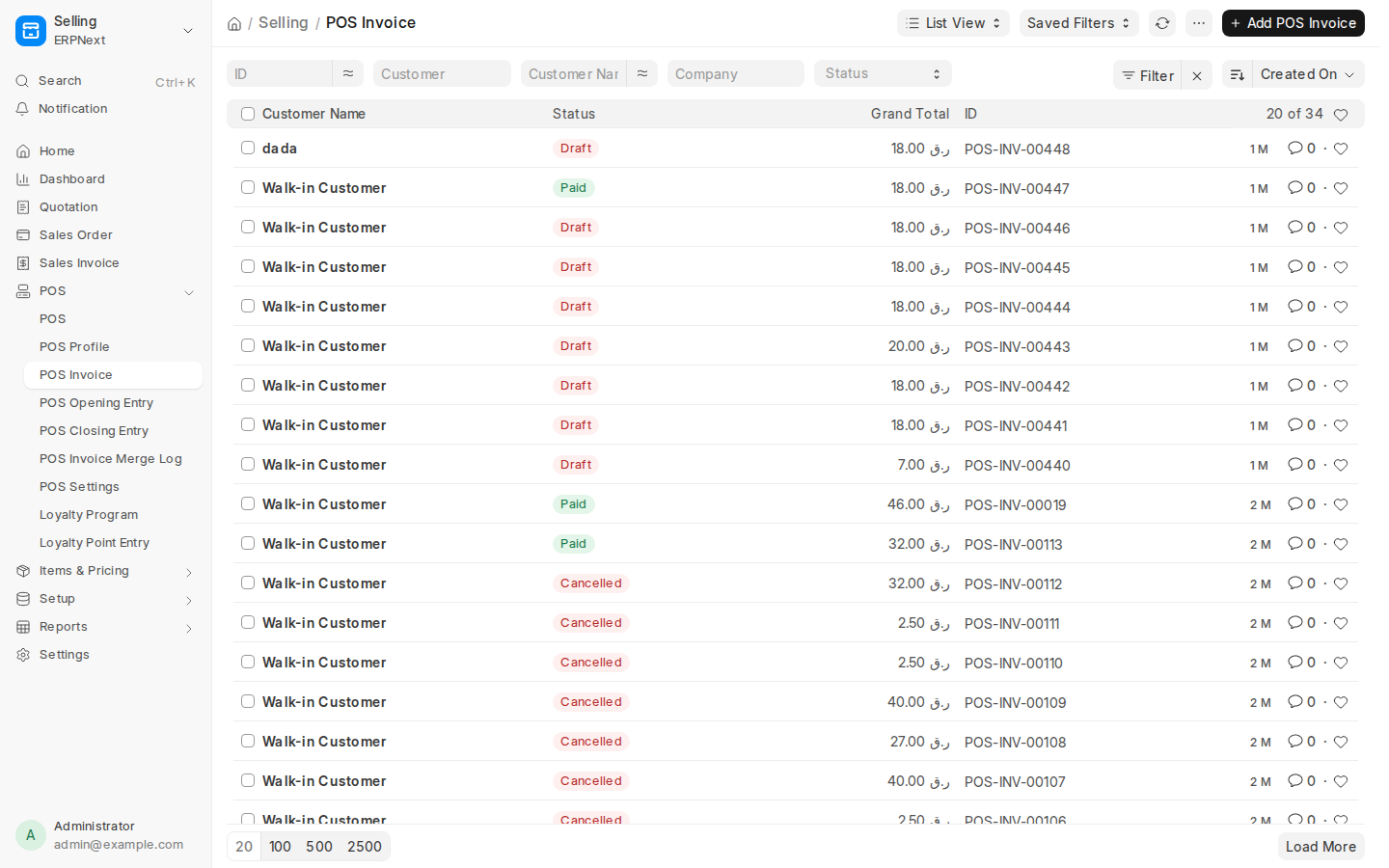
  • ✓ Live Status Tracking: Instant visibility into Draft, Paid, and Cancelled register entries with customer associations.
  • ✓ Audited Line Items: Complete drilldown into individual dish line items, add-on costs, and tax templates.
  • ✓ Automated Shift Closing: Reconcile cashier balances against expected drawer totals with supervisor verification.
  • ✓ Native GL Integration: Direct General Ledger posting upon shift closing without batch exports or manual syncing.
GET /app/pos-invoice
https://pos.basira.llc/app/pos-invoice
POS Invoice Register Ledger
📷 Live Bench Desk • POS Invoices & Register Ledger Open Invoice Ledger ↗
Zero Friction Hospitality

Dish Add-ons & Native Epson Hardware Dispatch

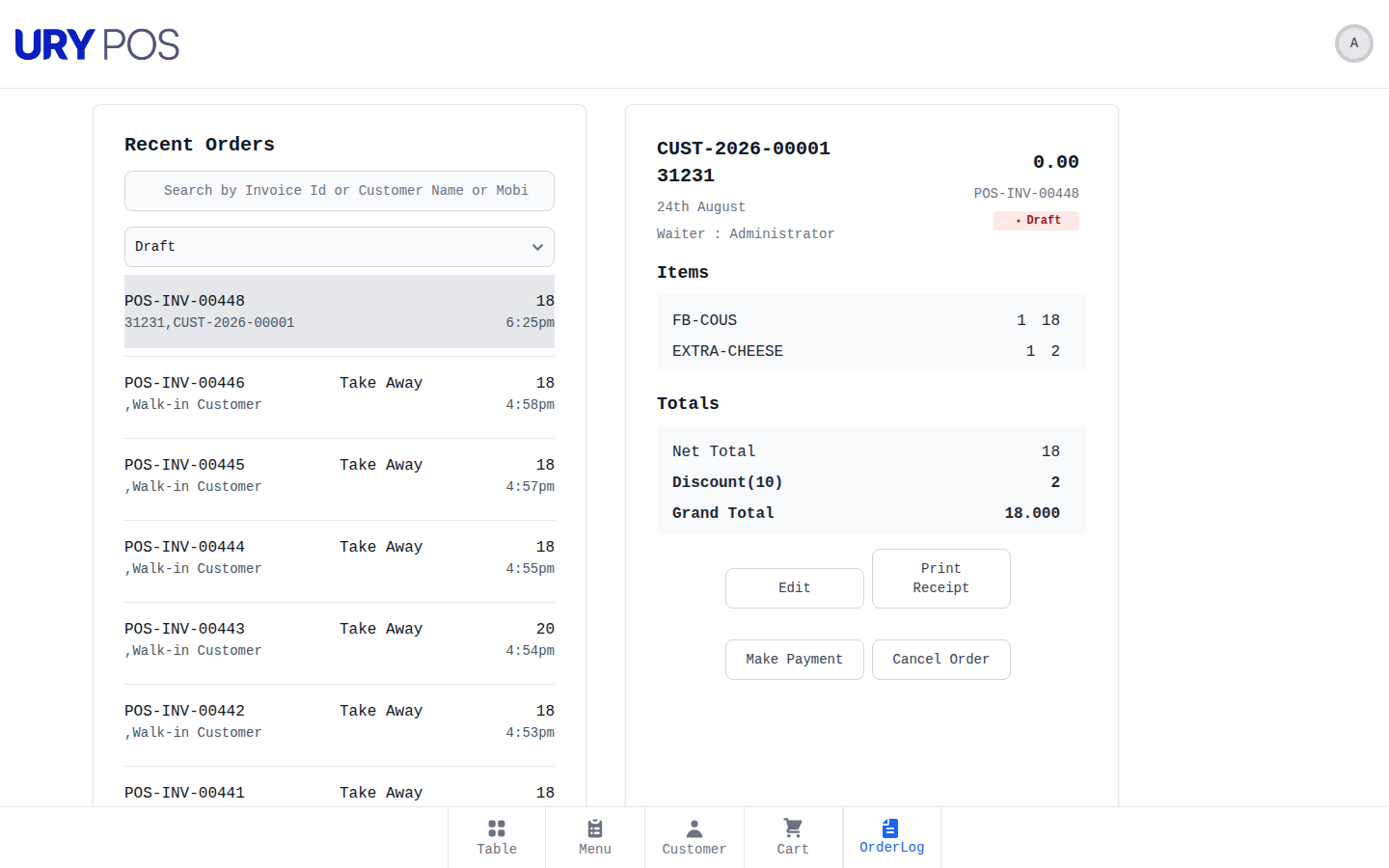
Granular inspection of live invoice POS-INV-00448 showing customer dada, dish line item FB-COUS (Couscous Royal), modifier item EXTRA-CHEESE (+2.00 QAR), and top-bar integration with Print with Epson.

Guest Check Flow

Direct ESC/POS Bill Dispatch via F7 or Touch Button

Unlike standard retail point-of-sale apps that force full payment before printing, our Epson Middleware hook adds a dedicated "Print with Epson" button and F7 / Alt+P keyboard shortcut.
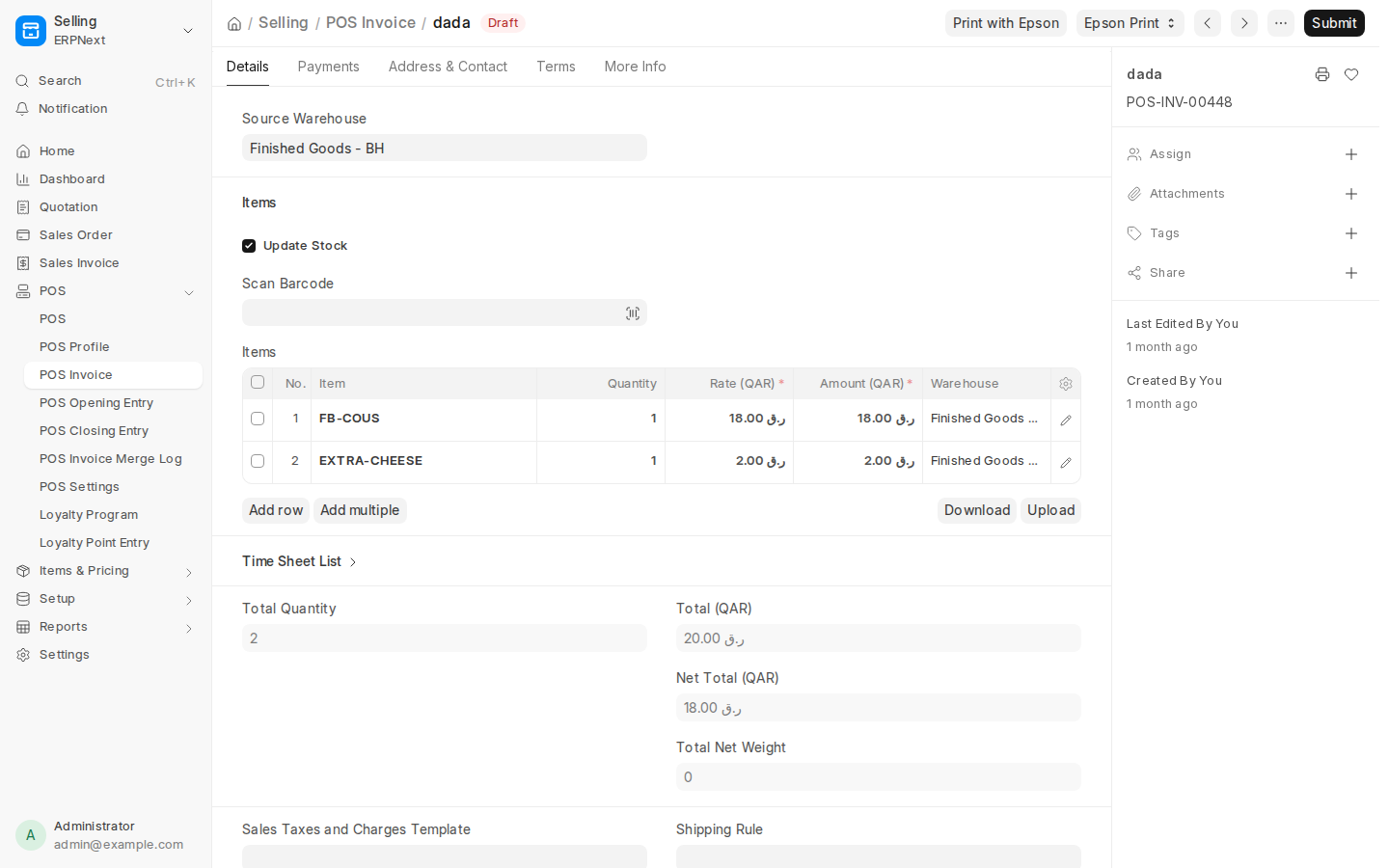
  • ✓ 100% Cart Preservation: Draft invoice is saved and printed instantaneously without clearing items or reloading the UI.
  • ✓ Bypasses Browser Dialogs: Direct raw TCP socket print over LAN to the designated cashier Epson TM-T20 / TM-T88 printer.
  • ✓ Itemized Modifiers: Add-ons (e.g. Extra Cheese) render nested under primary parent dishes on physical receipts.
  • ✓ Sub-Second Execution: Asynchronous server handshake sends ESC/POS payload to the thermal printer in under 90 milliseconds.
POST /api/method/epson_middleware.printer.print_now(printer_type="Bill")
https://pos.basira.llc/app/pos-invoice/POS-INV-00448
POS Invoice Dish Breakdown and Epson Print
📷 Live Document View • Invoice Items & Epson Print Trigger Inspect Document ↗
Hardware Infrastructure

Epson Printer Network & Hardware Health Fleet

Comprehensive enterprise thermal printer management. Monitor static IP addresses, printer paper states, online heartbeat telemetry, and test print connectivity across your entire restaurant or retail chain.

Hardware Fleet

Direct IP Address Fleet & Auto-Discovery

Manage Epson TM-m30, TM-T88VI, TM-T20III, and U220 impact kitchen printers directly through the centralized Epson Printer DocType registry.
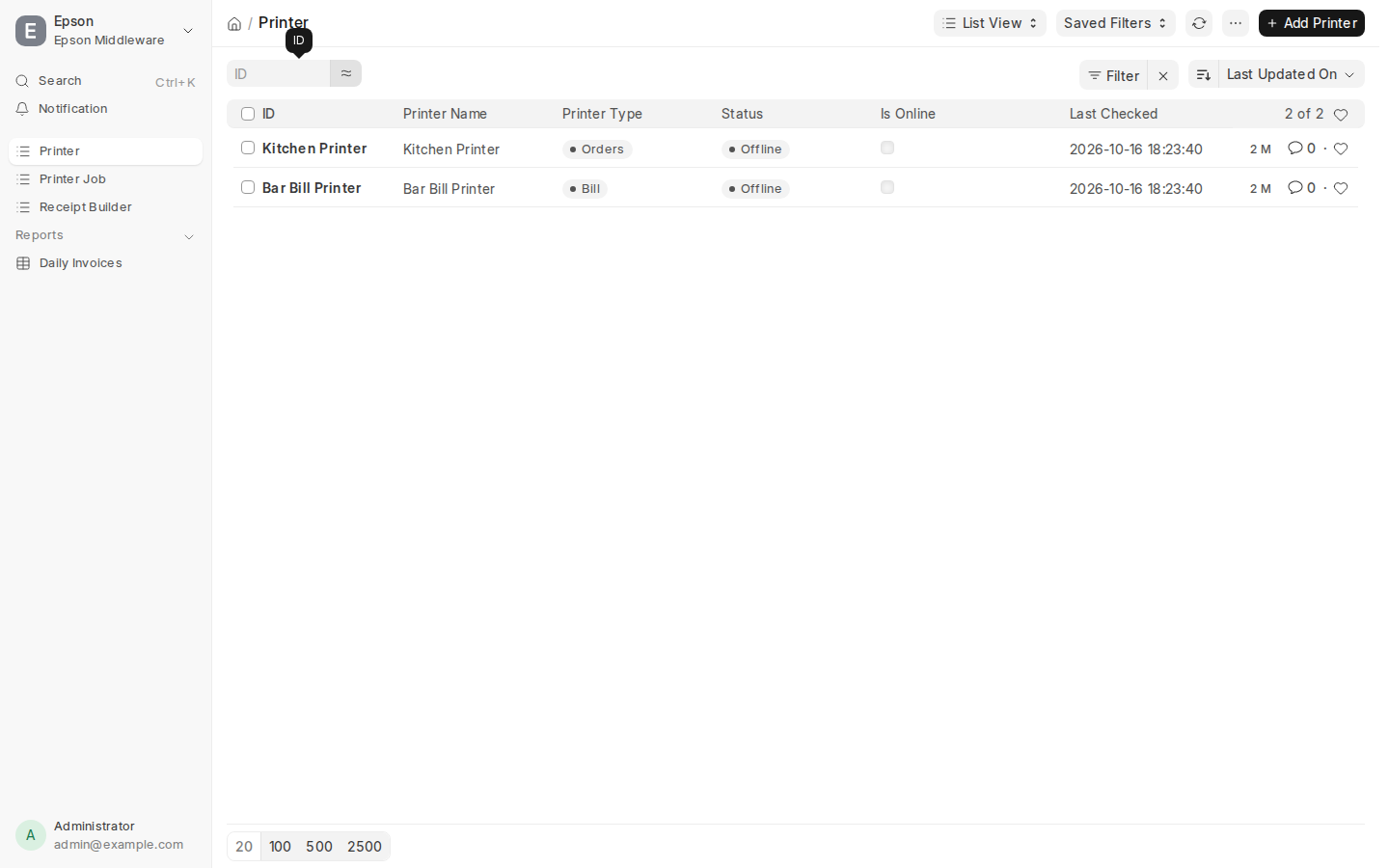
  • ✓ LAN Direct Socket: Connects over raw port 9100 without third-party print spoolers or desktop client drivers.
  • ✓ Paper-Out & Cover Alerts: Real-time hardware telemetry detects paper-roll depletion and open cover errors before jobs fail.
  • ✓ One-Click Hardware Test: Dispatch diagnostic ESC/POS alignment and font check chits directly from the desk interface.
  • ✓ Multi-Tenant Branch Separation: Assign printers to individual store locations, branches, or dining floors effortlessly.
GET /app/epson-printer
enterprise.local/app/epson-printer
Epson Hardware Network Fleet
📷 Live Verified Screen • Epson Hardware Network Registry Inspect Hardware Fleet ↗
Smart Order Fan-Out

Station Print Routing & Differential Round Dispatch

Split tickets with zero human intervention. When a cashier submits an order containing appetizers, hot mains, cold drinks, and desserts, Epson Middleware automatically routes items to their respective production stations.

Station Fan-Out

Item Group Station Mapping & Differential Rounds

Kitchen order chits (KOT) print with large readable fonts, station header tags, server names, table IDs, and timestamps.
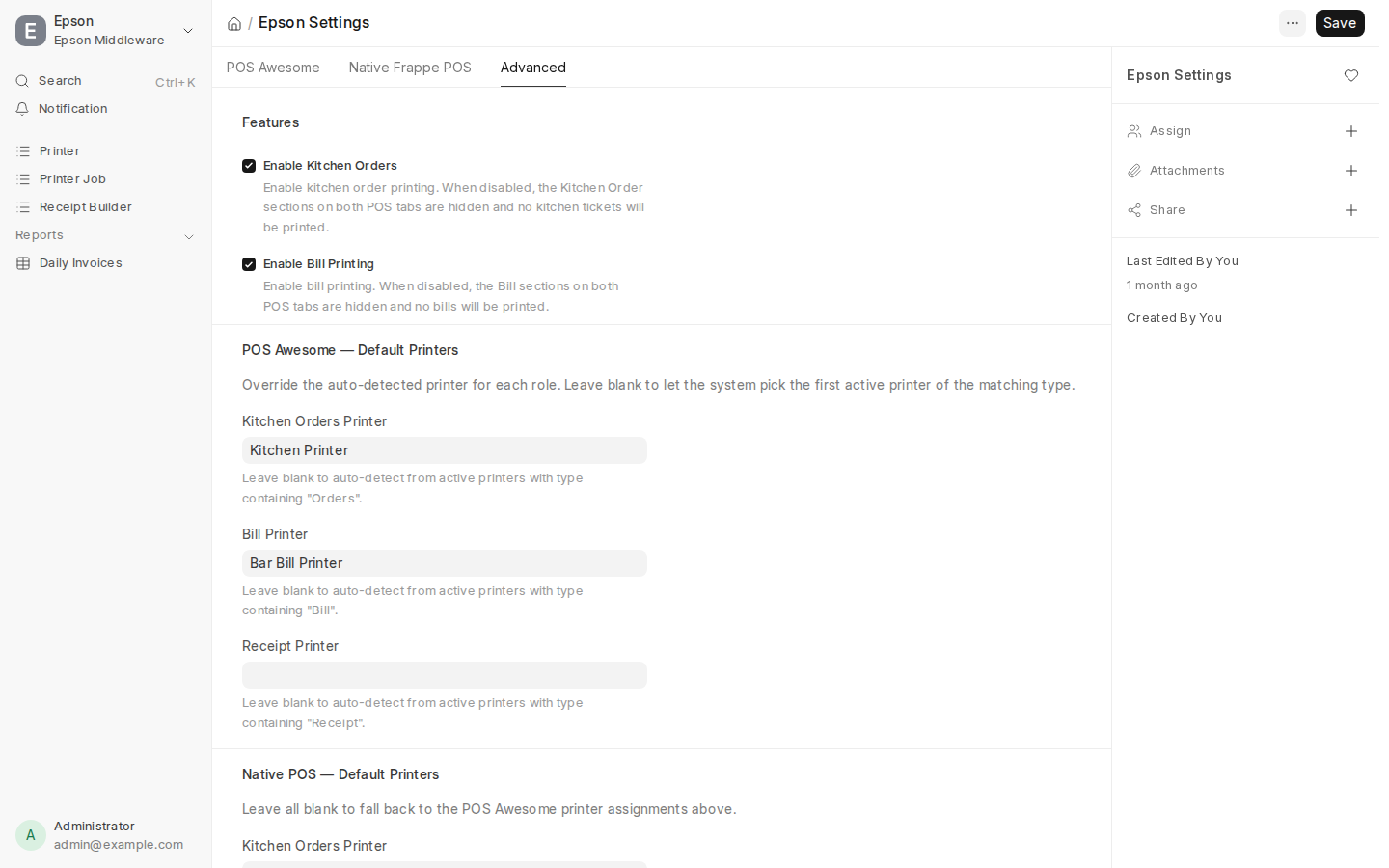
  • ✓ Category-to-Station Matrix: Map "Hot Dishes" to Grill, "Sushi" to Cold Bar, "Cocktails" to Bar, and "Sweets" to Pastry.
  • ✓ Differential Round Printing: Adding an extra round of drinks only prints the newly added items—never reprinting previous rounds.
  • ✓ Buzzer & Red-Black Print: Trigger internal audible buzzers on impact printers and highlight order modifications in red ink.
  • ✓ Failover Printer Fallback: If a station printer runs out of paper or goes offline, print jobs redirect to the backup cashier printer.
POST /api/method/epson_middleware.printer.print_now(printer_type="Orders")
enterprise.local/app/station-routing
Epson Station Routing Rules
📷 Live Verified Screen • Epson Station Print Routing Matrix View Routing Rules ↗
Financial Rigor

Cashier Order Auditing & POS Shift Closing

End-of-day register balancing without discrepancies. Full ledger tracing of every cash tender, credit card slip, drawer kick event, and shift closing entry with instant thermal Z-report generation.

Register Auditing

Electronic Cash Drawer Kick & Z-Report Audits

Automate cash control. The printer’s RJ11 DK port fires a 24V pulse to release the cash drawer upon cash tender submission or via manual supervisor hotkey (F9 / Alt+D).
  • ✓ Cash Tender Auto-Kick: Drawer kicks open only when valid cash payment is registered, preventing unauthorized drawer access.
  • ✓ Manual Kick Audit Logging: Emergency drawer openings record cashier ID, timestamp, and audit justification in Frappe logs.
  • ✓ Blind Cash Drop Closing: Cashiers enter physical currency counts at shift end; system highlights overages or shortages immediately.
  • ✓ Thermal Z-Report: Instant receipt printout summarizing gross sales, net taxes, discounts, tender breakdowns, and void counts.
GET /app/pos-closing-entry
enterprise.local/app/pos-order-log
Cashier Order Log and Shift Reconciliation
📷 Live POSAW Screen • Cashier Order Log & Status Ledger Inspect Closing Entries ↗
Engineered For Reliability

Hardware-Native Architecture Highlights

Built from the ground up to eliminate single points of failure in mission-critical retail and restaurant checkout environments.

🖨

Raw TCP Socket ESC/POS

Bypasses Windows/macOS print spoolers and OS dialog boxes. Delivers binary ESC/POS formatting directly over TCP port 9100 with sub-100ms print head response.

💵

Dual-Pin 24V Drawer Kick

Electronic drawer solenoid triggers via printer DK port pin 2 and pin 5. Supports dual independent cash drawers for multi-cashier shift stations.

🔄

Differential Round KOTs

Multi-round dining intelligence. When guests order additional rounds of drinks or dessert, station chits print strictly the delta items to avoid double cooking.

💻

Dual-Monitor Customer Display

Native /pos-menu-display route with HTML5 BroadcastChannel synchronization. Displays real-time cart updates, totals, and promotional banners to guests.

🔗

Offline Outbox Resilience

IndexedDB local storage buffers invoices when network drops occur. Invoices queue locally and sync back into ERPNext ledger immediately upon reconnection.

⚖

Direct General Ledger Posting

No external sync connectors or batch exports. Every checkout immediately debits Cash/Receivables, credits Sales Revenue, and depletes real-time inventory balances.

Enterprise Evaluation

POSAW + Epson Middleware vs. Cloud POS

A technical comparison against generic SaaS point-of-sale systems that rely on proprietary hardware locks and cloud print spoolers.

Operational Capability POSAW & Epson Middleware Toast / Square POS Lightspeed POS Odoo POS
Direct LAN ESC/POS Printing (Port 9100) ✓ Native Raw TCP ✗ Proprietary Cloud Spool ⚠ Desktop Driver Required ⚠ IoT PosBox Hardware
Pre-Payment Bill Print (Cart Preserved) ✓ Instant F7 Shortcut ✓ Supported ⚠ Multi-Step Menu ✗ Clears Cart State
Dual-Pin 24V Electronic Cash Drawer Kick ✓ Auto + Manual F9 ✓ Supported ✓ Supported ⚠ Via PosBox Only
Differential Round Kitchen Chits (KOT) ✓ Delta-Only Dispatch ✓ Supported ⚠ Extra Add-on License ✗ Reprints Entire Ticket
Dual-Screen Customer Menu Display ✓ Built-In HTML5 Broadcast ✗ Paid Proprietary Hardware ⚠ Separate iPad App ⚠ Web Popup Only
ERPNext Direct Ledger & Stock Sync ✓ Zero Latency DB Link ✗ Third-Party Zapier/API ✗ Batch CSV Export ✗ Odoo-Locked Only
Hardware Ownership & Zero SaaS Fees ✓ 100% Owned Hardware ✗ Monthly Per-Terminal Fee ✗ Expensive Subscription ⚠ Enterprise License Fee